Google

Monday, October 1, 2007

IBM Lotus Symphony: Free Office from IBM

Be Free. Work Smart.

Richly-featured productivity tools that are intuitive to use and compatible with your files.

Provided at no charge for your home, school or business.

Benefits for businesses, developers...and you

IBM® Lotus®Symphony™ offers something for everyone – a community-oriented site, a template gallery, and tips and support to help you succeed. Your business can get more control over spiraling upgrade costs while protecting and maintaining documents into the future. If you’re a developer, Lotus Symphony supports Microsoft® Windows® and Office applications, which means you get even more from your current investments. Read more... Users | Businesses | Developers

How is Lotus Symphony different?

You're in charge! Lotus Symphony is based on the Open Document Format (ODF) standard-which means you're not locked into proprietary file formats, software licensing agreements and upgrades. Finally, free tools and freedom of choice!

Can Lotus Symphony handle my existing files?

With Lotus Symphony, you can import, edit and save a variety of file formats including Microsoft Office files. You can even export your documents to Adobe® Portable Document Format (PDF). The tools work with computers running both Microsoft Windows and Linux- environments, with support for Apple Macintosh planned for the future.

Thursday, June 21, 2007

Internet Download Manager v5.11


Internet Download Manager (IDM) is a tool to increase download speeds by up to 500 percent, resume and schedule downloads. IDM has a smart download logic accelerator that features intelligent dynamic file segmentation and safe multipart downloading technology to accelerate your downloads. Simple graphic user interface makes IDM user friendly and easy to use.

New in Version 5.11 (Jun/20/2007)

1. Completely redeveloped IDM scheduler. Added periodic synchronization of files and the possibility to create new queues for downloading or synchronization. Added new features on starting and stopping queue processing
2. Improved user interface. Added processing of context menu key, fixed tabbing order on all dialogs, added mnemonic keys to the main menu and the menu of IDM Grabber
Version 5.11 includes all latest bug fixes

BitDefender Total Security 2008 Beta 1


BitDefender Internet Security covers all the security needs of an Internet-connected family. It provides comprehensive protection against viruses, spyware, spam, scams, phishing attempts, intruders and objectionable web content. BitDefender Internet Security is designed to place as little burden as possible on its users and on the host system, while providing state-of-the-art defense against current Internet threats.

New features included in BitDefender Total Security 2008 - Beta 1:
- New User Interface
- Tune Up and Backup
- New on-demand antimalware scanner
- Game mode

As you will see, the product comes with a new user interface and we welcome any ideas and feedback regarding its usability. The next beta will add some other items on the new features list like Defrag and bugfixes, all intended to improve your interaction with the product.

Known issues:
- Antimalware > Move to quarantine action for on-demand and on-access scanning fails
- Antimalware > Contextual scan on folders fails
- Antimalware > Game mode disabled on-access scanning
- Parental control > Web control does not block/allow sites added in the list of sites unless the site is properly formatted (http://[site]/)
- Firewall > The Firewall module is not integrated with WSC
- Firewall > BlueTooth connections fail due to the Firewall module
- Antispam > Antispam toolbar fails to be displayed in Windows Mail and Outlook Express
- TuneUp > Registry Cleaner and Registry Recover do not work on Windows Vista with UAC enabled
- TuneUp > For a large number of files, Duplicate Finder might be unresponsive
- Backup > On Windows Vista, Backup and Restore Wizards fail to work
- Installation> Sometimes uninstall fails. Please contact on beta.bitdefender.com for an uninstall tool.

Saturday, June 2, 2007

Nero 7 Lite 7.9.6.0


Nero 7 Lite is a full functional Burning Software Suite including:
· Nero Burning Rom
· Nero Express
· Nero CoverDesigner
· Nero WaveEditor
· Nero Toolkit
· MauSau Audio Plugins
· Complete Nero Help

However Nero 7 Lite is still a lite pack, so these programs are left out:
· Nero Home
· nero Scout
· Nero StartSmart
· Nero SoundTrax
· Nero Vision
· Nero Recode
· Nero Showtime
· Nero MediaHome
· Nero PhotoSnap
· Nero BackItUp
· Nero InCD
· Nero SoundBox
· Nero ImageDrive

A micro version only contains Nero Burning Rom with basic Audio/VideoCD support (English).

Changes in version 7.8.5.0:
- Added: the option to select to associate Nero witn the standard CD image files.
- Added: the shortcut to Nero Express.

Vista Codec Package 4.4.5


Codecs have always been a big problem for the computer users. That's because there has never been a 100% viable working solution available for the average computer user. There are several good codec package solutions out there, but none of them did everything i wanted. I was always in need of a tweak, adjustment, or even a reinstallation just to get the codecs I needed/wanted and most of the time, the file still didn't play. I've never claimed to be a media guru. My media experience is to doubleclick a file i downloaded and hope that it plays. What I do know is how to package software. So I decided to package some codecs and share them with the rest of the world. With this package all possible conflicts are already dealt with. Many user suggested default settings are implemented,

If you have a suggestion of improvement, I'm listening.

It does not contain a media player and it doesn't associates filetypes. With this package installed you will be able to use any media player, limited only by the players' capabilities, to play DVD's, movies and video clips of almost any filetype. Streaming video is supported in all popular web browsers. By default you won't need to make any adjustments to enjoy a variety of media content immediately. Users have the ability to choose what is installed using the public redistributable or after an unattended install, you can select to remove specific portions without removing the entire package. Future releases will recognize previous releases and are capable of performing upgrade installations.

changelog
- improved flv1/4 support
- add new support for SVCD's
- improved MPEG2-TS playback
- moved all icons into a DLL
- improved M2P playback
- fix xvidcore.dll issues (Vista)
- update ffdshow components 1187
- AC3Filter is default AC3 decoder
- x64 users - get the v123 update

IE7Pro v0.9.18 Final


IE7Pro is a must have add-on for Internet Explore, which includes a lot of features and tweaks to make your IE friendlier, more useful, secure and customizable. IE7Pro includes Tabbed Browsing Management, AD Blocker, Flash Block, Super Drag Drop, Crash Recovery, Proxy Switcher, Mouse Gesture, Tab History Browser,Web Accelerator, User Agent Switcher, Webpage Capturer, Greasemonkey like User Scripts platform, User Plug-ins, Spell Check and many more power packed features. You can customize not just Internet Explorer, but even your favorite website according to your need and taste using IE7Pro.

Changelogs: IE7Pro v0.9.18 (01-06-2007):
1. Firefox style Spelling Check function added (thanks-http://hunspell.sf.net).
2. Adblock default settings switch to off.
3. Fix some bugs.
4. Standalone spelling check dictionary installation package.

Wednesday, May 23, 2007

CPUCooL 8.0.4

CPU Cool is a set of tools designed to cool, optimize and monitor your system.


Some main features are:
- The ability to change the FrontSideBus.
- Shutdown Windows by keystroke
- A configurable Graphics display.
- Cooling under NT
- Readout the values programmed in the E2PROM of the SDRAM's.
- CPU optimization for Intel and AMD processors.
- Memory Optimization.

Download : CPUCooL 8.0.4

OpenOffice.org 2.2.1 RC2 Beta


OpenOffice is a free, Open Source alternative to MS Office with a Word compatible word processor, a complete Excel compatible spread sheet program and a Power Point like presentation software and drawing program and also allows to save to PDF file.
In addition, OpenOffice offers enhanced printing capabilities and options for direct connection with external email programs as well as form-letter management to send letters to addresses from a database.

OpenOffice.org writer - The powerful word processor
· The powerful word processor
· Wizards to produce standard documents such as letters, faxes, agendas, minutes.
· Styles and Formatting to put the power of style sheets into the hands of every user.
· AutoCorrect dictionary, which can check your spelling as you type.
· AutoComplete to make typing easy
· Text frames and linking for newsletters, flyers, etc..
· Table of contents, index for complex documents
· OpenDocument and MS-Word .doc format compatible


OpenOffice.org impress - Impress your audience
· Master Pages and Layouts simplify the task of preparing your materials.
· Complete range of Views are supported: Normall / Outlline / Slide Sorter / Notes / Handouts to meet all the needs of presenters and audiences.
· Easy-to-use drawing and diagramming tools to spice up your presentation.
· Slide show Animation and Effects to bring a presentation to life.
· Fontworks provides stunning 2D and 3D images from text.
· OpenDocument and MS-Powerpoint .ppt file format compatibility

OpenOffice.org calc - The full-featured spreadsheet
· Natural language formulas let you create formulas using words (e.g. "sales - costs").
· Hundreds of spreadsheet functions with built-in expert help
· Scenario Manager allows "what if ..." analysis at the touch of a button.
· Powerful graphics to extract the meaning from your numbers
· Pull in data from external databases with DataPilot technology
· OpenDocument and MS-Excel .xls file format compatibility

SlySoft CloneCD 5.3.0.5 Beta

neCD is the ideal tool to make backup copies of your music or data CDs, regardless if they are copy protected or not! CloneCD's award-winning user interface copies almost any CD in just a few mouse clicks! CloneCD allows you to create excellent 1:1 copies of your valuable original discs. E.g., should your copy protected music cd not play in your car audio, the backup created with CloneCD will!
Since release 5.0 CloneCD is able to copy not only CDs but as well all formats of DVD like DVD-R, DVD-RW, DVD+R, DVD+RW, DVD+R Dual Layer und DVD-RAM. Copy protected movie DVDs can only be copied with AnyDVD. The movies will not be modified (compressed), but one-to-one copied.

CloneCD also works with other formats such as ISO and UDF files and copies CDs/DVDs with the new SafeDisc 3 Copy Protection System. CloneCD allows you to create perfect 1:1 copies of your valuable original compact discs. Should your copy-protected music CD not play in your car audio, the backup created by CloneCD will.
Slysoft combine knowledge and innovation with many years of experience and direct communication with customers to provide constant improvements, therefore making CloneCD the highest quality copying application around.

Changes in CloneCD 5.3.0.5, 2007-05-21:
- New: Workaround for problem with U3 USB memory sticks
- Change: Workaround for registration problem on Windows Vista
- Fix: Autostart problems of CloneCDTray on Windows Vista
- Some minor fixes and improvements
- Updated languages

Thursday, May 17, 2007

FlashGet 1.84

FlashGet is a leading download manager and has the highest amount of users on the internet. It uses MHT(Multi-server Hyper-threading Transportation) technique, supports various protocols and has excellent document management features. FlashGet is a freeware without any adware or spyware.

FlashGet Version 1.8.4 (2007.05.16)
+Added exceptions report: exceptions report will be prompt to send to debugrpt{at}flashget.com
+Improved search toolbar
+Support eMule/ed2k
*Changed version format: MainVersion.MinorVersion.PatchVersion.ReleaseTimes
*Fixed some minor UI bugs

Download : FlashGet 1.84

RapGet v1.34b


RapGet (RAPidshareGET) is a downloader with code recognition for such share servers as rapidshare.de, megaupload.com, slil.ru and others. It make Your download from rapidshare faster.

Advantages of RapGet

a freeware;

a small soft (about 200 Kb);

autodownloads from 67 free share services;

a lot of simultanious downloads;

multilingual support (48 languages).
Download: RapGet v1.34b.

Tuesday, May 15, 2007

DVDFab HD Decrypter 3.1.1.2 Beta

DVDFab Express is simply the easiest way to copy a DVD movie. Just insert the movie and a blank DVD then press Start. Your entire movie - including menus, trailers and special features - is copied to a single DVD with just one click, and everything happens automatically.

DVDFab HD Decrypter comes with same functionality as DVDFab Decrypter, but with full HD-DVD and Blu-Ray support (Removes AACS).

FreeCommander (FREE) vs TotalCommander (FEE)

FreeCommander is an easy-to-use alternative to the standard windows file manager. The program helps you with daily work in Windows. Here you can find all the necessary functions to manage your data stock. You can take FreeCommander anywhere - just copy the installation directory on a CD, USB-Stick or even a floppy disk - and you can even work with this program on a foreign computer.


Main features in FreeCommander:

  • Dual-panel technology - horizontal and vertical
  • Tabbed interface
  • Optional tree view for each panel
  • Built in file viewer to view files in hex, binary, text or image format
  • File viewer inside archives too
  • Built in archive handling: ZIP (read, write), CAB (read, write), RAR (read)
  • Nested archive handling
  • Easy access to system folders, control panel, desktop and start menu
  • Copy, move, delete, rename files and folders
  • Wipe files
  • Create and verify MD5 checksums
  • File splitting
  • File properties and context menu
  • Calculation of folder size
  • Folder comparison / synchronization
  • Modification of file date and attributes
  • Folder / program favorites
  • File searching (inside archive too)
  • File filters for display
  • User defined columns for detailed view
  • DOS command line
  • Multiple language support

Monday, May 14, 2007

TV 2.0: Watch Television on Broadband Connection.

Now you can watch hundreds (300+) of LIVE worldwide channels on your PC, free of charge. TV is an extremely easy to use application and anyone can find their own favorite stations on TV. Music, news, educational, sports & shopping channels are sorted in a very easy to find way, together with TV in English, Spanish, German, French, Portuguese & Arabic sections.


You may also browse world TV by regions or by country name. No configurations or settings are needed. The intuitive & user friendly interface will give you a pure Plug n´ Play! Experience. All you have to do is easily find your desired station, click on the station´s name, then sit back & relax…
TV emulates the regular Television set on your PC, by using the high-speed (broadband ONLY!) Internet connection (xDSL, Cable or LAN, WiFi) for online global Television reception.

VDownloader

VDownloader allows you to download videos from Youtube, Google Video, Metacafe, MySpace, DailyMotion, Pornotube, and many other similar sites, saving them in AVI or MPG format.

Download videos from:

* Youtube
* Google Video
* DailyMotion
* MySpace
* Stage6 DivX
* Porkolt
* Metacafe
* Break.com
* 123 Video
* Bolt
* VSocial

Download: Click here.

Sunday, May 13, 2007

IE7Pro 0.9.15 Beta 1

IE7pro is an add-on for IE 7 which adds lots of features and extras to make your IE easier, more useful, secure and customizable. You can use IE7pro as Tab Management, AD Blocker, Flash Block, Super Drag Drop, Crash Recovery, Proxy Switcher, Mouse Gesture, Tab History Browser, Web Accelerator, User Agent Switcher, Webpage Capturer, Greasemonkey for IE and etc . Using IE7pro, you can Close/Open tab by double left click, build your own greasemonkey script, switch proxy, switch user agent, block ads and flash, recover browser crash, apply super drag drop, auto scroll page, manage tab history, refresh tab automatically, open new tab from address bar and favorites, view page information and save whole page to images quickly and so on.

Changelog:
1. Inline search added
2. Userscript system enhanced (See http://iescripts.org/help/index.html)
3. User can remove the blocked flash now.

4. AD Block filter can update online now.
5. You can copy current tab image to clipboard

Orbit Downloader 1.5.5


Orbit Downloader is a great speed, super light,easy-to-use free download manager. It is based on p2p and multi-source downloading technology and supports HTTP, HTTPS, FTP, MMS and RTSP protocols. Using Orbit Downloader, you can almost download everything online with 500% faster speed, like youtube video, rapidshare files, flash and streaming media etc. Anyway, Orbit Downloader is an indispendsable tool for download acceleration and management.

Changes in Orbit Downloader V1.5.5 ( May 11, 2007 ):
* Add an option to "Exit Orbit" or "Close Main Window" when click the close button on Main Window
* Add an option in the batch download filter dialog to mark all items
* Improve the DropZone Open/Close feature
* Improve the batch download feature
* The FireFox Add-on support Ukrainian (by gm)
* Fix some bugs

Saturday, May 12, 2007

Microsoft SharedView Beta

Microsoft SharedView Beta is a fast, easy way to share documents and screen views with small groups of friends or coworkers; anytime, anywhere. Use SharedView to put your heads together and collaborate.

Download: Click here.
Key Scenarios

Checkboxes and buttons

Suggested Reading

Task Snapshots

1. Starting a Session

2. Participating in a Session

3. Sharing Applications

4. Sharing Documents or Handouts

5. Concluding a Session

Vista Transformation Pack: Vista on XP

Many people who have seen it wish to get Vista-style looks for their OS.

This program will transform your Windows user interface to ultimate Windows Vista alike looks that everyone will never notice it’s the same old Windows XP (or 2003)

Features

Vista Transformation Pack will replace many of the resources in Windows XP/Windows Server 2003. It can change such things as:

  • Boot screen
  • Welcome Screen / Logon Screen
  • New msstyles files (visual styles)
  • New desktop and file icons
  • New toolbar icons
  • Progress Dialogs
  • Sounds scheme
  • System Tray icons
  • New Wallpapers
  • Windows Media Player Skins
  • And much more...

Maploco: ID Visitors view you Page.

Welcome to MapLoco Beta! The new service that lets you create a map showing where visitors to your page are coming from.

Simple to set up - just select Style in details and the code will be created for you to insert into your template.Tags: Maps, Blog-Tools, Maps...


Friday, May 11, 2007

Vista Codecs v4.4.2

Codecs have always been a big problem for the computer users. With this package installed you will be able to use any media player, limited only by the players' capabilities, to play DVD's, movies and video clips of almost any filetype.

Streaming video is supported in all popular web browsers. By default you won't need to make any adjustments to enjoy a variety of media content immediately.

Users have the ability to choose what is installed using the public redistributable or after an unattended install, you can select to remove specific portions without removing the entire package. Future releases will recognize previous releases and are capable of performing upgrade installations.

WHAT'S NEW IN VERSION 4.4.2:
* Update XviD components
* Update FFDshow components 1148
* remove Cyberlink's MPEG-2 codec
* add Dscaler.org MPEG-2 decoder
* rollback Haali components to v1.7.121
* fix several uninstall issues
* allow removed components re-added on the fly

Mozilla Firefox 2.0.0.4

Firefox is a free, open-source web browser for Windows, Linux and Mac OS X and is based on the Mozilla codebase. It is small, fast and easy to use, and offers many advantages over Internet Explorer, such as the ability to block pop-up windows.

Thursday, May 10, 2007

New Y!M Web Version for Vietnam

Yahoo introduced a new version of Yahoo!Messenger for Vietnam on May 8 in HCM City.

The new version allows YM users to quickly send messages everywhere and anytime from networked computers.

Specifically, when users visit http://webmessenger.yahoo.com website, they can immediately send messages freely at all networked computers, without the necessity of downloading YM as before.

This is considered an ideal service for people who often move and office workers who are limited by firewall and those who don’t want to install more software into their computers.

The new service of YM has been introduced in Vietnam and some other countries like Brazil, India, Malaysia, the Philippines, and the US. Yahoo plans to expand this service on the global scope this year.


NOD32 Antivirus System 2.70.37

NOD32 Antivirus System provides well balanced, state-of-the-art protection against threats endangering your PC and enterprise systems running various platforms from Microsoft Windows 95 / 98 / ME / NT / 2000 / 2003 / XP, through a number of UNIX/Linux, Novell, MS DOS operating systems to Microsoft Exchange Server, Lotus Domino and other mail servers. Viruses, worms, trojans and other malware are kept out of striking distance of your valuable data. Advanced detection methods implemented in the software even provide protection against the future threats from most of the new worms and viruses.

Download : NOD32 Antivirus System 2.70.37 for NT/2000/2003/XP 32/64-bit. It is Trial Version. I Recommend that you should buy this software if you want to use it for a long time. Thanks.

VoIP Skype 3.2.0.145

Screenshot
Skype is free and simple software that will enable you to make free calls anywhere in the world in minutes. Skype, created by the people who brought you KaZaA, uses innovative P2P (peer-to-peer) technology to connect you with other Skype users. If you are tired of paying outrageous fees for telephony, Skype is for you!
Skype is quick and easy to install. Just download it, register, and within minutes you can plug in your PC headset and call your friends on Skype. Skype calls have excellent sound quality and are highly secure with end-to-end encryption. Best of all, Skype does not require you to reconfigure your firewall or router—it just works!
Download : Skype 3.2.0.145


Portable Nero 7.8.5.0 Edition


INFO

http://www.nero.com/enu/index.html

Download Links

http://rapidshare.com/files/27163537/pnr7850ueewkg.part1.rar
http://rapidshare.com/files/27163659/pnr7850ueewkg.part2.rar
http://rapidshare.com/files/27163690/pnr7850ueewkg.part3.rar
Password: m2k-rslinks.org

Keygen only: http://rapidshare.com/files/27211477/pnr7850ueekgn_.rar

Nero 7.8.5.0 Portable Edition (90MB)

Download Link

http://rapidshare.com/files/27167431/pnr7850pe.rar
Password: m2k-rslinks.org

New Highlights in the ENHANCED edition
Windows Vista™ Ready
Author and Playback AVCHD and Blu-ray (BD-AV)
Compatible with SecurDisc™ technology for ultimate data protection
Nero MediaHome now with enhanced Xbox 360™ streaming capabilities
Capture, edit and watch HD Video
Designed for Windows Vista™ – enjoy Nero’s software applications with improved graphics and the streamlined features made possible with the Microsoft Vista operating system
Copy to disk with just one click using the new Nero DiscCopy Gadget
Watch and record live TV

Flower Fantasy: 3D Flowerbeds on Desktop

Plant & grow amazing, 3D flowers on your PC! Easily create fabulous 3D flowerbeds and flowerbed designs. Watch your flowers from any viewpoint and enjoy your favorite music.


These are the plants we chose for this flowerbed:

If you want to read an interesting story about the selected plants, click on the History button. Flower Fantasy includes the encyclopedia of history, legends, useful and interesting facts from the lives of plants.

Download: Click Here.
Vietnamese Entry: Click Here.

Wednesday, May 9, 2007

Send a FAX by e-mail

TPC Fax is a free service that lets you send text faxes by email. It doesn't have a huge international coverage, but it works for most big cities.

To send a fax, you need to drop a mail to:
remote-printer.
recipient_name@fax_number.iddd.tpc.int. For details about the syntax, go to this page

3D Effect in Mozilla Firefox.

Version: 1.1
Size: 38KB
Compatibility: firefox-sm.png 1.5 - 2.0.0.*
Requires: DirectX 8.0 or higher
homepage Homepage

Adds visual effects when current tab is changed.

IPB Image

Note: A bumped version will not work on Firefox 3.0a2 (Minefield).

install Install
Vietnamese Entry: Click here.

Make a Video Postcard with Movavi VideoMessage

Movavi VideoMessage is the greatest way to make a video invitation, postcard or just a video message and send it to your friends and relatives. There are 13 professional and 6 holiday frames suitable for any mood and occasion - holidays, birthdays, roadtrips - in Movavi VideoMessage. Video message can be created out of any popular format.


Movavi VideoMessage lets you create video postcards for your friends and family. You can even send personalized video greeting cards for special occasions and events!.

Shoot your video using any camcorder, webcam or cell phone camera. Upload the files to your PC. Launch Movavi VideoMessage. Choose a stylish frame to wrap around it. Type your message and click Start. It's that easy.

Movavi VideoMessage features 13 professional and 6 holiday frames suitable for any mood and occasion -- holidays, birthdays, roadtrips, and more. See what a difference a simple change of frames makes! Movavi VideoMessage lets you preview your video card on screen, then converts it for easy emailing or blogging in just minutes.

Download: Click Here.
Vietnamese Entry: Click Here.

Defragment your PC up to 10X faster.

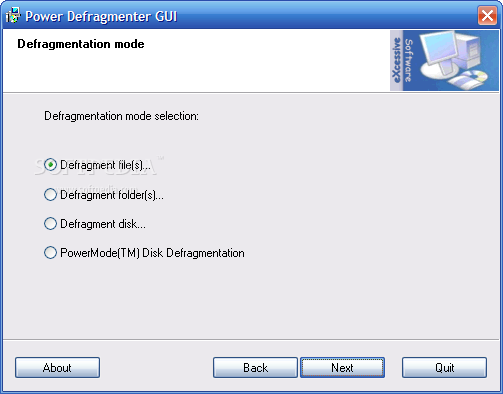
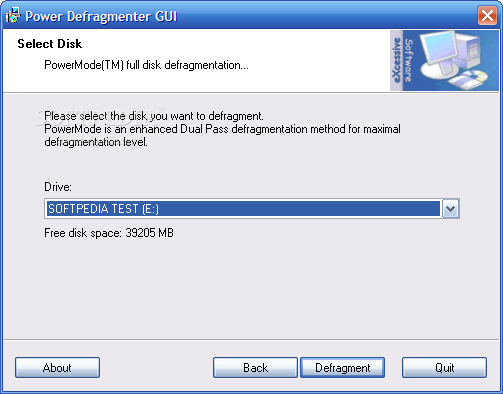
Power Defragmenter is a friendly user interface that helps you defrag your files, folders or disks easily.

Review image
Review image
Review image
Review image
Review image
Review image
Review image

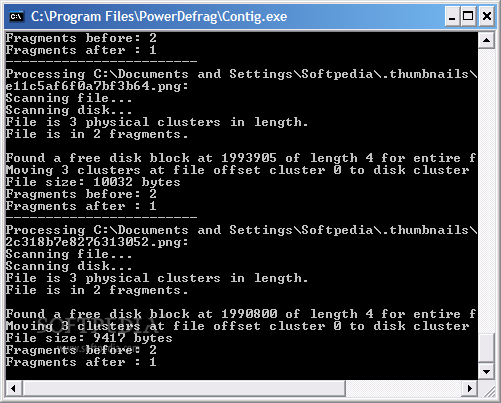
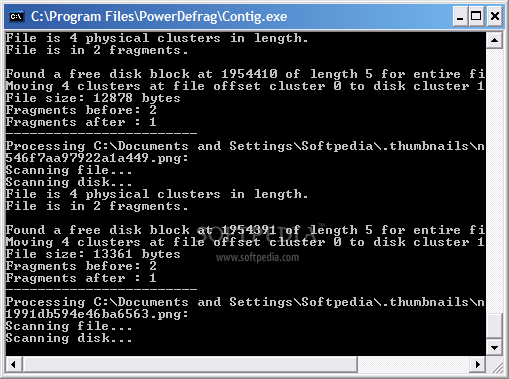
After downloading the archive you have to place the files together with Contig.exe in order to run. When you start Power Defragmenter it checks if Contig is present, and if not, you will be taken to the download page. Once the download is complete, you have to place Contig in the same location as its GUI and we're done! Don't worry about download times, both files are under 1MB in size.

The interface of the program is a small window that allows you to perform all operations available. Let's check out these operations...

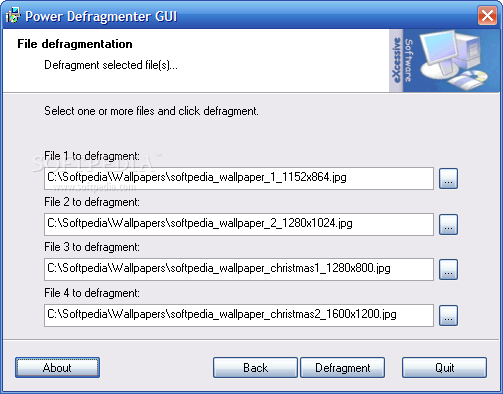
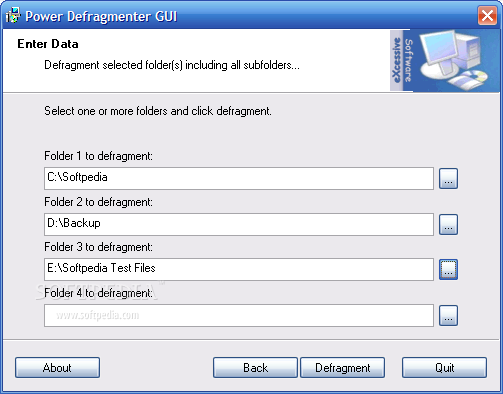
Files and folders defragmentation: if you don't need to defragment entire disks, you can choose to do this only with files or folders. Check the radio button for the item you want to defrag, press Next, then browse for one up to four files or folders. Hit Defrag to start the processes and it's as done! The defragmentation is done much faster than with the default tool that comes with Windows, so you won't grow old waiting for it to finish.

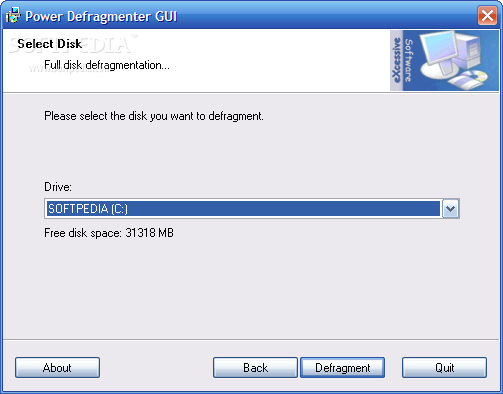
There are two more defragmentation modes: full and PowerMode. The first method processes all files from the chosen disk in a single pass while the seconds defragments the files twice to ensure best results (and it takes more time to do it, of course).
Download: Click Here.
Vietnamese Entry: Click here.

Turn the WebCam into a Funny Digital Camera.

WebCam or a Digital Camera
Cameroid is an interesting online service that lets you capture photographs online using any webcam and your web browser - no software to download or install.

Just plug-in your webcam to the computer and open www.cameroid.com in your web browser. Allow the Flash player to access the webcam and you are ready to take pictures.

Every picture that you capture using Cameroid has a permanent URL that you can link or embed in other sites like Bebo, MySpace or your blog. Cameroid can also create avatars in perfect sizes for your IM profiles.

The most interesting feature of Cameroid are the hilarios webcam effects - you can see yourself live in funny situations that range from morphing your face with a Mona Lisa painting to applying numerous picture effects as shown in the screen capture above.

Ms Word Excel Cracker: Recover lost or forgotten Passwords.

Ms Word Excel Cracker is a handy tool, designed to recover lost or forgotten passwords for password protected *.xls files created using Microsoft Word,Excel 97 2000 XP 2003 application or any other excel or word-compatible software.

Have you ever used password protected word or excel files? Perhaps you received such kind of files with important data from your business partner by e-mail or may be you keep data in password protected doc or xls files to prevent an illegal access.

If so, then you happened probably to forget or to be incapable to find a password to one of these *.xls, *.doc files. It becomes a more trouble if you need data stored in the file immediately.

Click here to download 605 Kb

Vietnamese Entry: Click here.

Make Photo Albums With 3D Effects

PictureTrail.com, allows its registered members to create online photo albums by uploading image files to Picturetrail servers. At PictureTrail.com, you can make cool photo Albums with 3D effects and embed into Blog or Sharing with your Freinds.

Vietnamese Entry: Click here.

Tuesday, May 8, 2007

Yod'm 3D: 3D Flip Effect on Windows XP

Yod'm 3D is a virtual desktop manager with the fashionable effect : the cube


By default, the rotation of the cube is done with the keys CTRL+SHIFT+Arrows :

  • CTRL+SHIFT+Left/Right = Next/prev desktop

  • CTRL+SHIFT+Up = Activate and show a "far" view of the current desktop, Left and right to turn the cube

  • CTRL+SHIFT+Down = Activate and show a "near" view of the current desktop, Left and right to turn the cube

Hold down CTRL+SHIFT to use the mouse to turn the cube.
( The rotation is possible only horizontally )


To move a windows to another desktop :

  • Click on the title bar of the window (not maximized if possible), hold down
  • Push CTRL+SHIFT to activate the cube, hold down
  • When the cube is activated, move the window on left or right
  • Release CTRL+SHIFT

To change the wallpaper of a desktop :

Just use Windows !
For each desktop, change the wallpaper using the windows display setting.

Switch to another application :

Click on the Yod'm 3D icon in the taskbar, the list of the windows opened in other desktop appear.
Click on the application to switch to the desktop.
Download: Click here.
Vietnamese this Entry: Click here.

CrossLoop – Simple Secure Screen Sharing

CrossLoop Screenshot

CrossLoop – Simple Secure Screen Sharing

  • Connect Any Two PCs on Earth
  • Simple, Easy-To-Use Interface
  • Available in 21 LanguagesNew!
  • Works through Firewalls and NAT
  • Secure Screen Sharing in under Sixty Seconds


  • What is CrossLoop?

    CrossLoop is a FREE secure screen sharing utility designed for people of all technical skill levels. CrossLoop extends the boundaries of VNC’s traditional screen sharing by enabling non-technical users to get connected from anywhere on the Internet in seconds without changing any firewall or router settings. It only takes a few minutes to setup and no signup is required.

    Is CrossLoop Secure?

    Security is built into all aspects of CrossLoop. Session data is encrypted at the end-points before being sent using a 128-bit encryption algorithm using a randomly generated 12-digit access code. Explicit permission is required before any screen images are sent to a remote computer. CrossLoop is a secure tool to remotely assist any PC on the planet.

    Download: Click here.
    Vietnamese this Entry: Click here.

    Monday, May 7, 2007

    Kaspersky Internet Security 7.0.0.81 Beta

    Kaspersky® Internet Security (KIS) is a fully integrated solution that protects your computer from all of the most common Internet threats, including viruses, hacker attacks, adware, spam and spyware.
    Main Advantages:
    * Integrated protection from all Internet threats
    * Cutting-edge antivirus technologies
    * Personal firewall
    * Protection from spam and phishing
    * Instant database updates
    * Free technical support

    Key Features:
    * Real-time monitoring of all data streams, including email, Internet traffic and network connections
    * Protection from viruses, Trojans and worms
    * Protection from spyware, adware and other potentially hostile programs
    * Proactive defense against new malicious programs
    * Protection from network attacks and system hijacking
    * Blocking of popup windows and banners
    * Rollback of changes made by malicious programs on your computer
    * Blocking of links to phishing websites
    * Trainable spam filtration system
    * Support for Windows Vista™ and 64-bit systems

    WinRAR 3.70 Beta 8

    WinRAR is an archive manager with support for packing RAR and ZIP archives and unpacking RAR, ZIP, ZIP64, 7Z (7-Zip), CAB, ARJ, LZH (Lempel-Ziv-Huffman), TAR, GZ, ACE, UUE, BZ2, JAR (Java Archive developed by Sun Microsystems) and ISO (ISO9660) archives. You may use it to backup your data, reduce the size of email attachments, decompress files downloaded from the Internet and create your own file archives.


    WinRAR features:

    * WinRAR introduces an original compression algorithm. It allows higher compression ratios than other PC archiving tools, especially for executable files, object libraries, large text files, etc.
    * WinRAR offers an optional compression algorithm highly optimized for multimedia data.
    * WinRAR supports files and archives up to 9,223,372,036,854,775,807 bytes in size, about 9000PB. The number of archived files is unlimited for all practical purposes.
    * WinRAR provides complete support for RAR and ZIP 2.0 archives and is able to unpack CAB, ARJ, LZH, TAR, GZ, ACE, UUE, BZ2, JAR, ISO, Z, 7Z archives.
    * WinRAR supports NTFS file security and data streams.
    * WinRAR offers both a classic interactive Windows interface and the command line interface.

    * WinRAR provides functionality for creating a 'solid' archive, which can raise the compression ratio by 10% - 50% over more common methods, particularly when packing large numbers of small files.
    * WinRAR offers the ability to create and change SFX archives using default and external SFX modules.
    * WinRAR offers the ability to create a multi-volume archive as SFX.
    * WinRAR offers a number of service functions, such as setting a password, adding archive and file comments. Even physically damaged archives may be repaired and an archive may be locked to prevent further changes. Authenticity information may be added for additional security and WinRAR will store information on the last update and name of the archive.

    Bugs corrected in Version 3.70 beta 8:

    - WinRAR shell extension did not work in Windows NT 4.0;
    - when unpacking ZIP archives in command line mode WinRAR returned "write error" (numeric 5) code in situations when it should return "create error" (numeric 9).

    Download : WinRAR 3.70 Beta 8

    Get More Out of Your Wireless Network

    Wi-Fi: It's not just for laptops anymore. With these products and tips, you can cut the cord when making phone calls, streaming music or video, sharing files, and more.

    Dead spots in your Wi-Fi network are bad enough when you're checking e-mail on your laptop; they're seriously aggravating if you're on a Wi-Fi phone call or listening to streaming audio. Strengthening the signal may be as simple as relocating your router to a more central location, away from obstructing materials like brick, concrete, metal, and water. Just mounting the router high on a wall may do the trick; see last September's Step-by-Step for more tips.

    If you're ready to buy hardware, though, a new generation of stronger Wi-Fi equipment can give you whole-house coverage, while also increasing throughput, at a relatively low cost. See our latest look at several of these more powerful products.

    Improve Streaming Media

    If you watch a streaming video sent over a congested network, interference that might simply slow regular data transfers can ruin your movie experience with stutters or halts. Audio and VoIP calls are vulnerable too. Quality of Service networking technology tries to address this issue, primarily by prioritizing multimedia data. The IEEE standards body is creating a QoS standard for Wi-Fi, called 802.11e.

    In the meantime, the Wi-Fi Alliance is promoting an interim standard (with elements that will be part of 802.11e) called WMM (for Wi-Fi multimedia). Many VoIP-ready routers have some form of QoS technology as well. If you're buying a new router or other Wi-Fi device, make sure it includes WMM or 802.11e QoS support, or comes with a vendor promise to do so via a firmware upgrade. Note, though, that both your router and your Wi-Fi adapters must use the same QoS technology.

    Untether Games, Printers

    While the white-hot Nintendo DS and Sony PlayStation Portable handheld game players both have built-in Wi-Fi, a simple Wi-Fi ethernet bridge lets the older GameCube, PlayStation 2, and Xbox set-top game consoles handle wireless online game play. (The GameCube and the PlayStation 2 first need broadband ethernet adapters before they can go Wi-Fi.) Office printers and other networkable devices can go wireless with a bridge, too. Products such as Belkin's F5D7330 Wireless G Ethernet Bridge & Game Adapter usually cost from $75 to $100 and simply plug into the ethernet port on any network-capable device, with no driver or software required. You may need to connect the bridge to your computer first to enter your WPA or WEP encryption password, but that's it.

    Downloads for Getting the Most out of Vista

    Microsoft unleashed Windows Vista on a complaisant world several months ago, and already 20 million people have installed it (according to the company). If you're one of those 20 million, you're undoubtedly wondering, "Where are all the Vista downloads?"

    Well, they've finally started to arrive. Since the operating system is still relatively new, the flow of downloadable tools and programs designed specifically for it has hardly reached flood proportions. But the first items have appeared, and some of them are very good indeed.

    This month I'll describe four of my favorite Windows Vista downloads, which let you do things such as easily create your own Sidebar gadgets, power up the Start menu's search box, and tweak and hack Windows Vista in myriad ways.

    Amnesty Generator

    Click for enlarged image.

    Among Windows Vista's best new features are the Sidebar and the gadgets that live on it. The gadgets are useful or playful mini-applications that perform all kinds of neat tasks for you--display your RSS feeds, get the latest stock quotes and weather reports, tell you how much of your processor is in use at a given moment, and so on.

    Gadgets aren't exclusive to Windows Vista, of course. The Web contains thousands of them on such sites as Google and Yahoo. But these gadgets were designed to live on Web pages, and couldn't run on your Sidebar in Windows Vista.

    Until now, that is. The free program Amnesty Generator lets you take a gadget that you find on the Web, and (as if by magic) transform it into a gadget that can live on the Windows Vista sidebar. You don't have to know a lick of code to perform this trick either; all you have to do is click a few buttons, and cut and paste.

    Install Amnesty Generator. Then, when you come across a Web gadget you'd like to turn into a Vista gadget, click a few buttons to display the gadget's underlying HTML code. Copy and paste that code into Amnesty Generator, change a few settings (such as the gadget's name or size) if you wish, and tell Amnesty Generator to turn it into a Windows Vista gadget. The gadget will appear in the Windows Vista Gadget Gallery; from there you can move it to the Sidebar, and it will work just like any other Windows Vista gadget.

    One caveat: This tool can't convert and run every gadget you find on the Web, and there's no way to know ahead of time which will work and which won't, so you'll have to find out by trial and error.

    Vista Manager

    Click for enlarged image.

    If you want to tweak Windows Vista six ways to Sunday, you should give Vista Manager a try. This remarkable program packs numerous utilities--each one of which lets you change multiple Vista settings--into a single interface.

    Listing all the tweaks and customizations you can do with this program would practically fill a book, so I won't try to detail them all. But if you'd like to turn Aero on or off, disable specific Aero features, or even force Aero to work on an older PC, you can from here. Vista Manager also lets you customize just about every part of the Desktop, Start menu, and Taskbar, as well as your icons.

    Then there's a whole set of optimization tweaks for speeding up your system, plus system repair tools, ways to tweak Internet Explorer, security enhancements, network customization tools...Suffice it to say, the list is long indeed. There's even a Registry defragmenter and cleaner.

    Vista Manager is free to try for 15 days. If you want to use it beyond that time, you must pay a $40 registration fee.

    Vista Shortcut Overlay Remover

    Click for enlarged image.

    Who says that every download should fundamentally changes the way you compute?

    I sure don't. Sometimes, the best downloads are simple, one-trick ponies that handle a single task exceptionally well. Case in point: The free Vista Shortcut Overlay Remover enables you to shrink or remove the annoying arrows that appear on shortcut icons on your Windows Vista desktop. Those arrows are particularly annoying in Windows Vista because the desktop icons--and the arrows--are so large.

    The program is a model of simplicity. Activate it, specify whether you want a small, light arrow or no arrow at all on shortcuts, and click Apply. Then log off and log back on again. Voila: You've just removed or miniaturized and lightened all of your shortcut arrows. To get the default shortcut arrows back, run the program again and select the normal-size arrow.

    Start ++

    Click for enlarged image.

    Windows Vista's useful new search box on the Start menu makes it easy to search your PC for files, programs, e-mail messages, and contacts, or to search the Web.

    The free Start++ download turbocharges that search box, enabling you to create shortcut commands and aliases for dealing with all kinds of tasks, both on your PC and on the Internet. For example, if you want to search Google for the word Nibelung, simply type g Nibelung in the search box, and press Enter; Start++ will immediately launch a Google search for you, and display the results in your browser.

    The program includes a 'search startlets' feature that can automate complex tasks when you type in a word or two. For example, type play Mozart at the search box and press Enter; the app will search for all music on your PC that contains the keyword 'Mozart', create a playlist using the results, launch Windows Media Player, and play each piece on the playlist.

    Start++ comes with an array of preset search and command startlets. The application's creator expects to make search gadgets--gadgets that can work right on Windows Vista's Start menu--available soon.

    You can easily generate your own command startlets and search startlets by filling in a simple form. With startlets at your disposal, you'll find countless ways to make life at the keyboard easier. And given that the program is free, it's a hard deal to pass up.


    Profile Visitor Map - Click to view visits